

Microsoft PowerApps ushered in a new era of app building. The cumbersome process of building apps has been converted into one that is simple, quick and easy. Hail PowerApps!
Apps built using PowerApps are immediately mobile and cloud proof. Not just that the cost of building and maintaining apps is also much lesser. Being a Microsoft solution, it offers all the power of Microsoft tools in one place. What more? You don’t require any prior coding knowledge when it comes to building apps using PowerApps.
This month Microsoft has made available new Office 365 screen templates in PowerApps. With the new feature, you can add Microsoft Office capabilities to their custom apps in just few clicks. All you need to do is insert one of the screens within PowerApps studio and all the required data sources, expressions and components will be added for you.
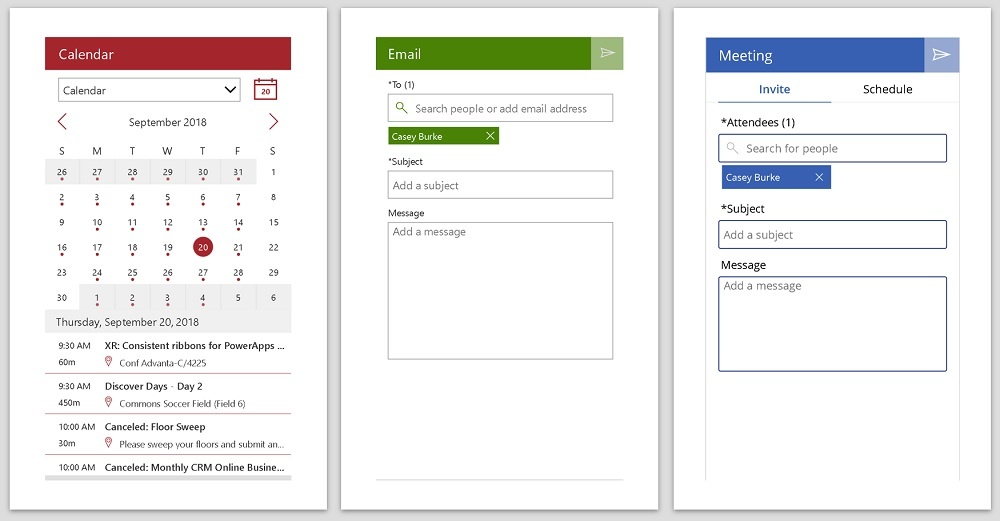
The screens are completely customizable and work together. For instance, if you add People, Meeting and Email screens, the people selected will automatically appear on all 3 screens.
Exploring New screens
- People
Easily search for users in your organization
Send emails from anywhere in the app
- Meeting
Send meeting invite via Outlook quickly. To streamline the entire process, suggested meeting times are automatically populated.
- Tutorial
With this screen, you can easily guide users how to use your app.
- Make this as the first screen in your app.
- Calendar
Add custom calendar functionality to your app and easily keep a track of your schedule for any given date.
- Success
The screen essentially enables you to add confirmation for a user action. For e.g. after sending a meeting invite or submitting a form.
Things to remember
- Top 15 results will only be returned while searching for people
- For the screens, navigation has not been pre-defined. You will have to define this behavior to navigate to the next screen
- Once the primary action is completed, MyPeople collection will be cleared. Once an e-mail is being sent, the collection will be cleared. The list will also be cleared for other screens reading from that collection.
- By default, screens like Email, People and Meeting read and write from the "MyPeople" collection. In case, you want to change this behavior, change the Items property of MeetingPeopleGallery to a different collection name.
- In the meeting screen, while searching for rooms, only 20 rooms will be returned at a time.
Ready to learn more about customizing Microsoft Office in PowerApps? Get in touch with our team of experts today.
Are you in search of an intranet solution for your organization? Step up the game with Dock 365!
Schedule a free demo now

Book a Live demo
Schedule a live demo of Dock 365's Contract Management Software now.